
OWASP MCP Top 10: Risks, Controls, and Testing for MCP Servers
A technical guide to the OWASP MCP Top 10 beta, with practical controls for MCP clients, servers, tools, credentials, context, and audit records.
The OWASP MCP Top 10 is a beta awareness document for security risks in systems that use Model Context Protocol servers and tools. Its ten entries cover credentials, excessive permissions, poisoned tools, dependency compromise, command execution, subverted intent, weak access control, missing telemetry, unauthorized servers, and unsafe context sharing.
The list is useful, but it is not a complete MCP security standard or a substitute for threat modeling. The official OWASP project page identifies the current release as version 0.1 and places it in beta review. Teams should record the version they use because names and ordering may change before a final release.
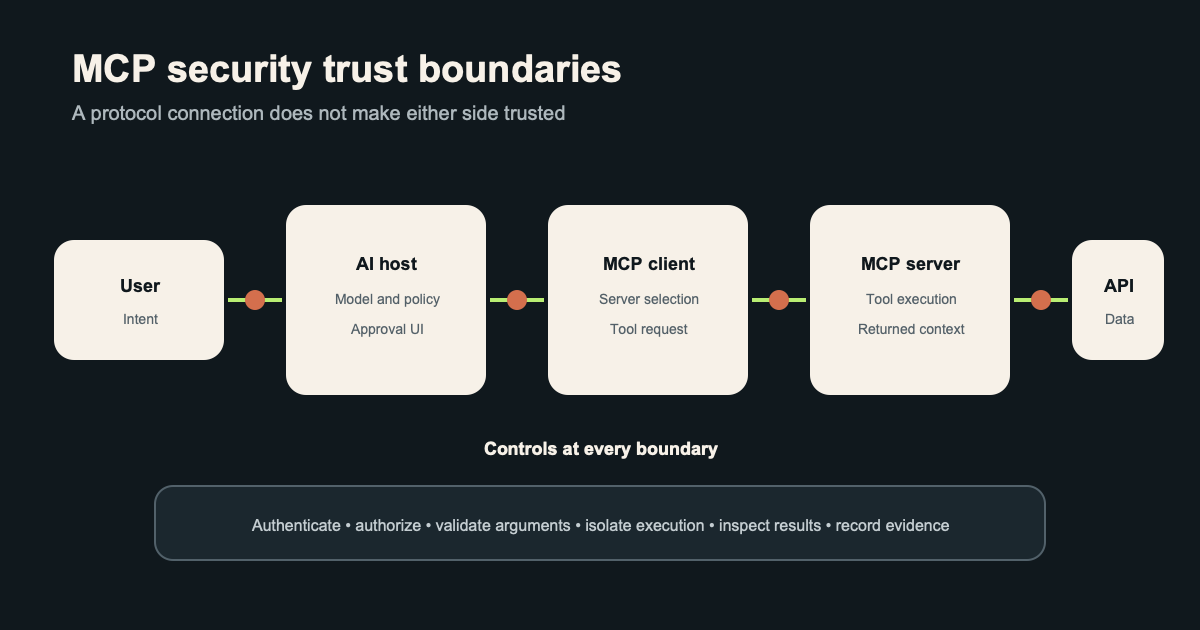
MCP connects an AI application to data sources and callable tools through a common protocol. That connection can cross several trust boundaries in one request, so an apparently simple tool call may involve a user, model, host application, MCP client, server, identity provider, downstream API, and returned content.
Key Takeaways
- Treat every MCP server, tool definition, returned result, and context item as an input from a separate trust boundary.
- Give each server and tool narrowly scoped, short-lived credentials instead of passing a user’s broad token through the entire chain.
- Validate tool arguments and outputs with deterministic code before they reach a shell, database, browser, or privileged API.
- Log the user, agent, server, tool, arguments, authorization decision, approval, result, and credential identity for each consequential call.
What the OWASP MCP Top 10 Covers
The project focuses on failures created or amplified by MCP integrations. Some entries, such as command injection and supply chain compromise, are familiar application security problems. Others apply familiar controls to MCP-specific objects such as tool descriptions, context windows, server registries, and agent intent.
An MCP deployment should be modeled as an application architecture, not as a trusted pipe between a model and a tool. The protocol defines how components communicate, while the host application still decides which servers are allowed, which credentials they receive, whether a person must approve an action, and what data may return to the model.
The OWASP page currently uses both zero-padded identifiers such as MCP01 and shorter forms such as MCP1 in different sections. This article uses MCP01 through MCP10 for consistency while preserving the project’s category names.
OWASP MCP Top 10 Risks Explained
MCP01: Token mismanagement and secret exposure
MCP servers often need tokens for source control, cloud APIs, databases, ticketing systems, or internal services. Risk appears when a host passes a broad user token to every server, stores long-lived credentials in configuration, includes secrets in prompts, or writes them into logs and traces.
Use a secret manager or workload identity flow to issue a credential for one server and purpose. Bind the token to a narrow audience and scope, keep its lifetime short, redact it from context and telemetry, and test revocation. The workload identity federation guide explains how software can obtain temporary access without keeping a static cloud secret.
MCP02: Privilege escalation via scope creep
Scope creep occurs when a server or tool gains permissions beyond its original job. A read-only repository assistant can quietly acquire write access, organization administration, or access to unrelated repositories as integrations expand.
Record the permitted resources and actions as policy rather than relying on a tool description. Review grants when tools change, expire temporary access, and require a new decision when an action crosses from reading to writing or from one tenant to another.
MCP03: Tool poisoning
Tool poisoning manipulates a tool, its description, schema, metadata, or returned content so the model selects an unsafe action. A malicious description may contain hidden instructions, while a compromised server can change a familiar tool after the user has approved it.
Pin trusted server versions, authenticate the server, inspect changes to tool schemas, and separate display text from executable policy. A host should authorize the resolved operation and arguments, not the model’s interpretation of a natural-language description.
MCP04: Software supply chain attacks and dependency tampering
An MCP server may depend on packages, container images, installation scripts, remote APIs, and transitive libraries. Compromise in any one component can steal local secrets or change tool behavior before the model sees a result.
Use reviewed sources, locked versions, dependency scanning, signed build artifacts, and an inventory that maps each running server to its code and owner. Run third-party servers with restricted filesystem, network, process, and credential access so dependency compromise has a smaller reach.
MCP05: Command injection and execution
Command injection becomes possible when a server inserts model-generated or attacker-controlled text into a shell command, SQL statement, template, browser action, or API request. Prompt filters cannot make unsafe string construction reliable because hostile data may arrive through a document, tool result, repository, or web page.
Pass structured arguments to fixed operations and use parameterized APIs. Allowlist commands and destinations, reject unexpected fields, run tools inside restricted environments, and place an approval step before destructive or externally visible actions.
MCP06: Intent flow subversion
Intent flow subversion redirects an agent from the user’s task through instructions hidden in retrieved context or tool output. For example, a document summarization task can encounter text that tells the model to call another tool and disclose private data.
Keep the original task, permitted actions, and target resources in a policy object outside the prompt. Compare each proposed call with that object, treat retrieved content as data, and stop the run when the plan changes in a way the user did not request.
MCP07: Insufficient authentication and authorization
Network access to an MCP server does not establish who is calling or whose authority supports the request. Shared credentials, missing tenant checks, and authorization based only on a tool name can let one user or agent act on another user’s resources.
Authenticate the human, agent workload, client, and server where the architecture needs those identities. Make authorization decisions at the server and again at the downstream resource, using subject, tenant, action, object, delegation, and current session context.
MCP08: Lack of audit and telemetry
MCP activity can disappear inside ordinary model traces that omit the server identity, resolved tool, arguments, approval, policy result, or downstream response. That prevents responders from determining whether an action was proposed, authorized, executed, retried, or altered.
Create structured audit events with stable request and tool identifiers. Protect sensitive values while retaining enough context to reconstruct a run, connect downstream API events, detect unusual tool sequences, and prove that revocation stopped later calls.
MCP09: Shadow MCP servers
Shadow servers are MCP deployments that operate outside an organization’s inventory and review process. Local developer tools are especially easy to install, and they may inherit browser sessions, source code access, environment variables, or personal API tokens.
Maintain an approved registry, discover listening servers and client configuration, and restrict which binaries or remote endpoints clients can load. Give teams a usable review path so temporary experiments receive an owner, expiry date, data classification, and restricted execution profile.
MCP10: Context injection and over-sharing
Context over-sharing exposes prompts, retrieved records, tool results, or memory across users, agents, tasks, or tenants. Injection adds hostile instructions to that context and depends on the model treating them as part of its decision process.
Partition context by tenant, user, purpose, and run. Apply access checks before retrieval, label provenance, limit retention, remove secrets, and prevent one server’s output from automatically becoming another server’s instruction.
MCP Security Controls Should Follow the Call Path
A useful MCP review begins with one concrete action, such as reading a private repository issue or updating a production ticket. Trace the request from the user through the model host, MCP client, selected server, tool handler, downstream service, and response. At each boundary, record the accepted input, authenticated identity, authorization rule, credential, output, and failure behavior.
This method prevents a common review error: checking the MCP server while ignoring the host and downstream API. A secure server cannot compensate for a host that silently approves dangerous calls, and a careful host cannot fix a downstream API that accepts an overprivileged token.
High-impact operations should use confirmation that names the real action and target. “Allow tool” is too vague for a payment, repository push, identity change, or message sent to another person. Approval should display the destination, material arguments, expected side effect, and identity used to perform it.
How to Test an MCP Deployment
Start with inventory and negative authorization tests. Attempt to call every tool as the wrong user, tenant, agent, and scope. Repeat the test with expired credentials, altered audiences, missing approval, and a server whose tool schema changed after registration.
Then test hostile content through every channel that reaches the model. Place instructions in user prompts, documents, web pages, repository files, tool descriptions, tool results, image text, and stored memory. The goal is to confirm that untrusted text cannot expand permission or turn a read task into a write action.
Exercise command and argument handling without relying on the model to generate a perfect exploit. Send shell metacharacters, path traversal sequences, unexpected URLs, oversized values, duplicate fields, and type mismatches directly to the handler. Verify that fixed schemas and downstream libraries reject them before execution.
Finish with detection and containment. Revoke a credential during a run, disable a server, change a tool version, and simulate a compromised dependency. Confirm that active sessions stop as intended and that audit records let an investigator connect the user request to every resulting action.
How MCP, LLM, and Agentic Top 10 Lists Differ
The MCP list covers the protocol integration layer. The OWASP LLM Top 10 covers model-enabled application risks such as prompt injection, sensitive information disclosure, improper output handling, and unbounded consumption. The OWASP Agentic Applications Top 10 covers systems that plan and act across multiple steps, including goal hijack, inter-agent communication, cascading failures, and rogue agents.
One application may need all three lists. An agent can suffer goal hijack, select a poisoned MCP tool, and pass its output to code that handles model text unsafely. Mapping the entries to components and data flows is more useful than choosing one list as the winner.
The AI agent authorization guide adds detail on delegation, least privilege, approvals, and revocation. Those controls reduce the impact of several MCP risks even when model behavior remains uncertain.
Frequently Asked Questions
Is the OWASP MCP Top 10 a final standard?
No, the current OWASP MCP Top 10 is version 0.1 and the project page describes it as a beta under pilot testing. Teams can use it as an awareness and review aid while tracking later revisions. It does not replace a threat model, protocol specification, or organization-specific risk assessment.
Does MCP provide authentication and authorization automatically?
MCP defines communication patterns, but a deployment still has to select and enforce its authentication and authorization model. The host, server, and downstream service may each need a separate decision. A valid protocol message does not prove that the caller may perform the requested action.
What is MCP tool poisoning?
Tool poisoning is manipulation of a tool, its metadata, schema, description, or output to influence model behavior. The attack may arrive in an initial installation or a later update to a previously trusted server. Version control, server authentication, schema review, isolation, and policy outside the model reduce its impact.
Should every MCP tool require human approval?
Low-impact read operations may run under preapproved policy when identity, scope, and data handling are clear. High-impact, destructive, financial, privileged, or externally visible actions should require confirmation that states the actual target and effect. Approval cannot repair an overprivileged credential or unsafe command handler, so it must sit beside technical controls.